Streamlining File Transfers with VxFlow: A Simple Solution for Secure and Automated File Management
Managing file transfers between servers can often be a complex task, especially when dealing with constraints like one-way SSH access or ensuring data integrity.
Problem Statement
I recently tackled an interesting challenge involving two servers: Server-A and Server-B. While Server-B could connect to Server-A via SSH, the reverse was not possible. On Server-A, a service was generating files based on messages from an MQ queue, but I had no direct access to modify this service. I needed to move these files reliably to Server-B, ensuring data integrity, avoiding duplicates, and handling potential errors in the process.
Overview
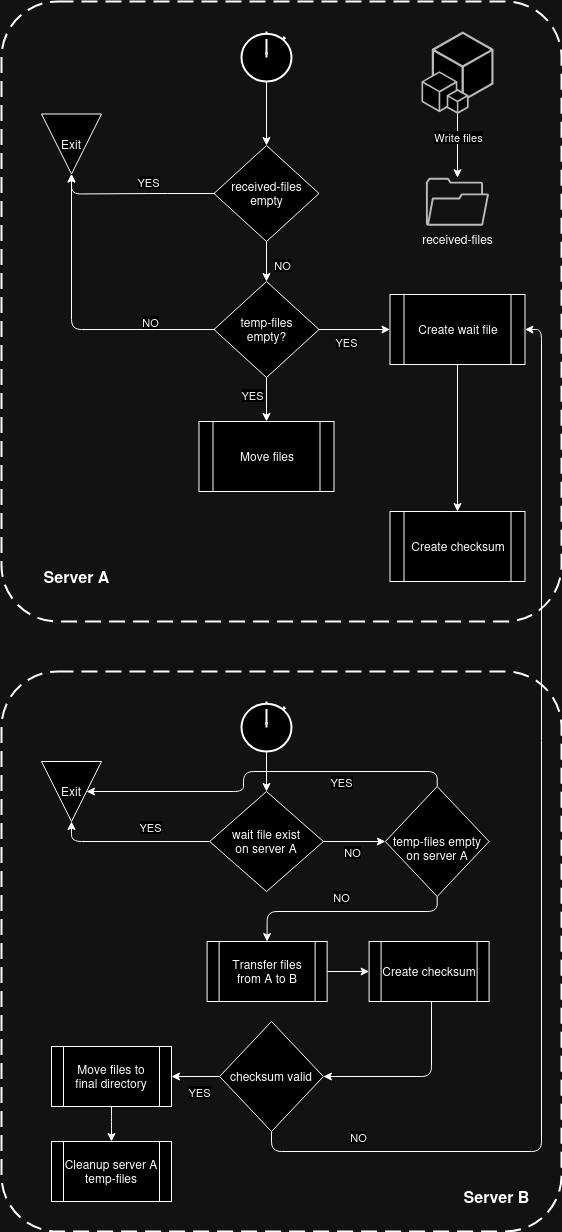
To solve this, I developed two Bash scripts: one for each server. Here’s how the process works:
- On Server-A:
- A script periodically moves files from the service’s output directory to a temporary directory.
- It generates a checksum for the files and creates a special “wait” file to signal that the process is ongoing.
- The script runs every minute but pauses if there are files already in the temporary directory, ensuring a consistent state.
- On Server-B:
- A script checks the temporary directory on Server-A via SSH for the presence of the “wait” file.
- If the “wait” file is present, it exits, as this indicates that the transfer on Server-A is not yet complete.
- If the “wait” file is absent, it copies all files from Server-A’s temporary directory to its own temporary directory on Server-B.
- After the files are transferred, the script calculates a checksum and compares it with the checksum file from Server-A.
- If the checksums match, the files are moved to their final destination on Server-B, and the temporary directory on Server-A is cleaned up.
- If the checksums do not match, the script triggers a recalculation process on Server-A and exits.
Diagram
Ensuring Data Integrity with Checksum Verification
To prevent data corruption or incomplete transfers, the solution uses checksum verification at every step. The process involves:
- Calculating a checksum for the files on Server-A after preparation.
- Recalculating the checksum on Server-B after transferring the files.
- Comparing the two checksums to confirm data integrity.
- If the checksums mismatch, the script triggers a recalculation on Server-A and retries the transfer, ensuring accuracy.
Automation and Scheduling
The entire process is automated using cron jobs. The script on Server-A runs every minute to prepare files, while the script on Server-B runs periodically to transfer and verify them. This ensures seamless, ongoing file transfers without manual intervention, making the workflow highly efficient.
This two-script solution demonstrates how you can automate file transfers and ensure data integrity using lightweight, open tools. By addressing constraints like one-way SSH access and service limitations, I was able to build a robust system that could handle errors gracefully and operate without manual supervision.
Sharing
To make it accessible to others, I’ve uploaded both scripts to GitHub. The repository includes:
- The Server-A script for file preparation, checksum generation, and signaling readiness.
- The Server-B script for transferring files, verifying data integrity, and cleaning up temporary directories.
- A detailed README file with instructions on how to set up and customize the scripts for your own environment.